
Free · in your browser
Click Drop Internal-Time Trainer
Lose the click. Keep the time. Begin with a clear rhythmic check, then remove subdivisions or entire measures — and find out whether the pulse stays internal when the reference disappears.

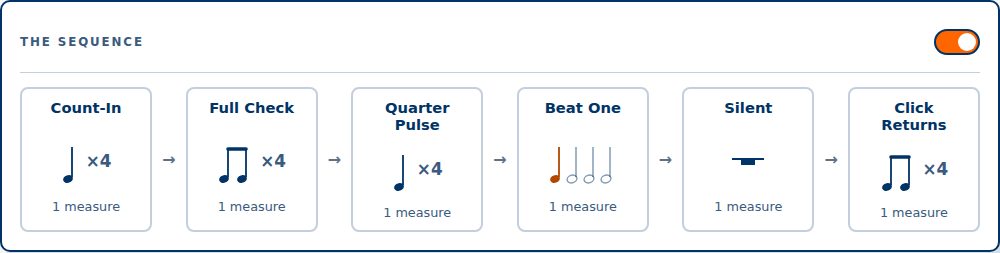
- Count-In 1 measure
- Full Check 3 measures
- Quarter Pulse 1 measure
- Beat One 1 measure
- Silent 1 measure
- Click Returns 1 measure
What it is
A metronome that takes itself away
Click Drop is a web-based internal-time trainer built by a percussion educator. It plays a clear rhythmic check, progressively removes that information, goes silent for one or more measures, then brings the click back — so you can hear whether you kept the tempo.
The app never listens to you and never scores you. The returning click is the feedback; the completion screen in Challenge Mode is explicitly self-assessment. It works on any phone, tablet, Chromebook, or computer with a browser.
See it in action
Watch the reference disappear

Key features
Built for the band hall
Quarters, eighths, triplets, 16ths, 5-lets, and 6-lets — the check that sounds before the app starts taking it away.
- Three On / One Off — three measures of check, one silent
- Two On / Two Off
- One On / One Off
- Drop the Check — full check, eighths, quarters, beat one, silence, then the click returns
- Hold the Pocket — two full, two quarter-pulse, one silent, one return
Pick your own: one to eight measures of check against one to eight of silence, so students can't predict the pattern.
Every stage is drawn in real notation before you press Start — one beat's pattern ×4, a whole rest for silence — so the class can see what's coming.
During silent measures the beat-by-beat visuals hide too. Turn on Show pulse during silence when a student needs the support back.
Off, first cycle only, or every cycle — one to four bars long.
Runs Hold the Pocket for two, four, six, or eight cycles, then shows tempo, check, sequence, cycles, elapsed time, and an optional self-rating. The app isn't grading you.
The Setup and Sequence panels each have a header switch, so a teacher can hide the controls once the settings are dialed in.
40–240 BPM by slider, by −5/−1/+1/+5 steppers, or by tapping it in. 4/4 in this release.
Report a problem and Request a feature open a visible, editable message. Users can open it in a configured email app or copy all details into webmail when a managed device has no email app set up.
No account, no install, no personal data. Your practice-run count stays in your browser.
Who it's for
Students, classrooms, and studios
Stop leaning on the click. Start with three measures on and one off, then take away more — subdivisions, then the pulse, then whole measures — and let the returning click tell you the truth.
Project it, set the check and the sequence, then hide the controls. The sequence preview shows the whole class what's about to disappear, and Custom mix makes the silence unpredictable.
Assign a tempo, a check, and a sequence for the week. Students open the same browser-based tool on any device — no app to install, no account, no version issues.
Why it's different
A metronome tells you where the beat is. Click Drop asks you.
-
It removes information on purpose
Gradual, staged removal — subdivision, then pulse, then whole measures — instead of an on/off mute.
-
The feedback is the click
No microphone, no scoring, no grade. The click comes back and you hear where you are.
-
Silence means silence
Visuals hide themselves during silent measures, so students train their ears rather than watching a light.
-
Unpredictable when you want it
Custom mix means students can't count the pattern instead of feeling the time.
-
Free
No paywall, no account, no download. Open the URL and practice.
Ready to lose the click?
Launch Click Drop — free, no signup. Need a walkthrough? The operating guide covers every control and sequence.