
Free · in your browser
Stick Lab
Build the rhythm, see the count, choose the sticking, practice the check. A free percussion measure builder and sticking-practice tool that runs entirely in your browser.
What it is
A measure builder and a sticking lab
Stick Lab is an offline percussion measure builder and sticking-practice tool. Build one measure of 4/4, view it as a timing grid or as real rhythmic notation, turn on counting and stickings, and practice it against a steady check pattern with looping playback.
Tap noteheads on and off until the measure matches the music in front of you — a book, a packet, an audition excerpt, a lesson assignment. Nothing to install, no account, and no network needed once the page has loaded.
See it in action
One measure, three ways to read it

Key features
Built for the band hall
One measure of 4/4 in quarter, eighth, triplet or sixteenth subdivisions — 4, 8, 12 or 16 slots. Tap any notehead to turn it on or off.
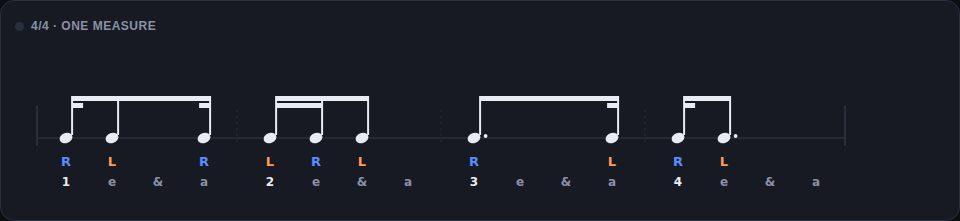
Grid gives you big tappable cells, easiest for building a rhythm. Notation shows the same measure on a rhythmic staff.
Flags, Dotted or Beamed. Durations, rests, beams, partial beams, augmentation dots and triplet brackets follow standard notation rules for every pattern you can build.
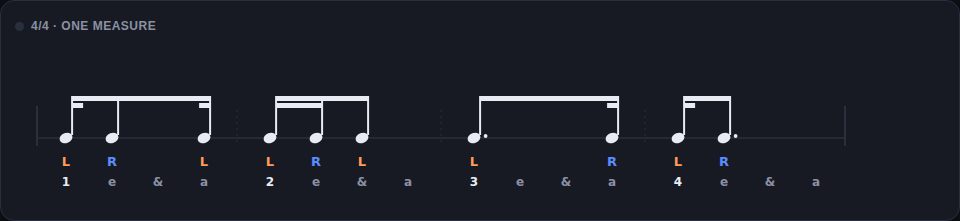
- Alternating: hands walk across played notes only — a silent slot never consumes the alternation
- Natural: every beat restarts from the starting hand, so an empty beat doesn't shift the next one
- Start from R or L, and override any single note to R, L or Auto
- Before: one full measure of straight subdivisions, then yours
- Underneath: the same subdivisions running quietly beneath your measure
- During the check, the notes you turned off light up too — your rhythm is the full subdivision with notes removed
Play, loop, and set tempo anywhere from 40 to 240 BPM. The check voice and your measure use distinct sounds, and each beat's first subdivision is emphasised so the pulse stays audible.
Randomize builds a playable practice rhythm and clears any sticking overrides. Reset turns every note back on. Both are one tap.
Every control is a standard button, including each notehead, and noteheads are labelled for screen readers.
No account, no backend, no network requests, and no storage of any kind. There is no practice data to collect, and the app keeps running offline once it has loaded.
- Quarter1 2 3 4
- Eighth1 & 2 & 3 & 4 &
- Triplet1 trip let 2 trip let 3 trip let 4 trip let
- Sixteenth1 e & a 2 e & a 3 e & a 4 e & a
Who it's for
Students, classrooms, and studios
Match the rhythm you're stuck on, see the count under it, and hear where each note lands against a running subdivision. Practice the sticking your teacher assigned, or override a note and try the other hand.
Build a rhythm on the classroom display, switch from grid to notation so students read what they just heard, and set the check pattern to Before so the whole section hears the subdivision first.
Start the check pattern Before, then switch to Underneath once the rhythm is close. Hearing their notes land against a running subdivision makes rushed and dragged notes obvious without you saying a word.
Why it's different
A grid isn't notation. Stick Lab shows you the same measure as both.
-
Percussion-specific
Counting, sticking, and check patterns built for the band hall — not a generic rhythm trainer with drums bolted on.
-
Two views, one measure
Build in the grid, read it as notation. The same rhythm, so students connect what they tapped to what's on the page.
-
The check makes timing audible
A steady subdivision before or underneath your measure turns "that felt off" into "that note came early."
-
Free
No paywall, no account, no download. Open the URL and practice.
-
Works everywhere, offline
Phone, tablet, Chromebook, desktop, classroom display. Any browser, and no network once it's loaded.
Ready to practice?
Launch Stick Lab — free, no signup. Need a walkthrough? The operating guide covers every control and both check-pattern modes.